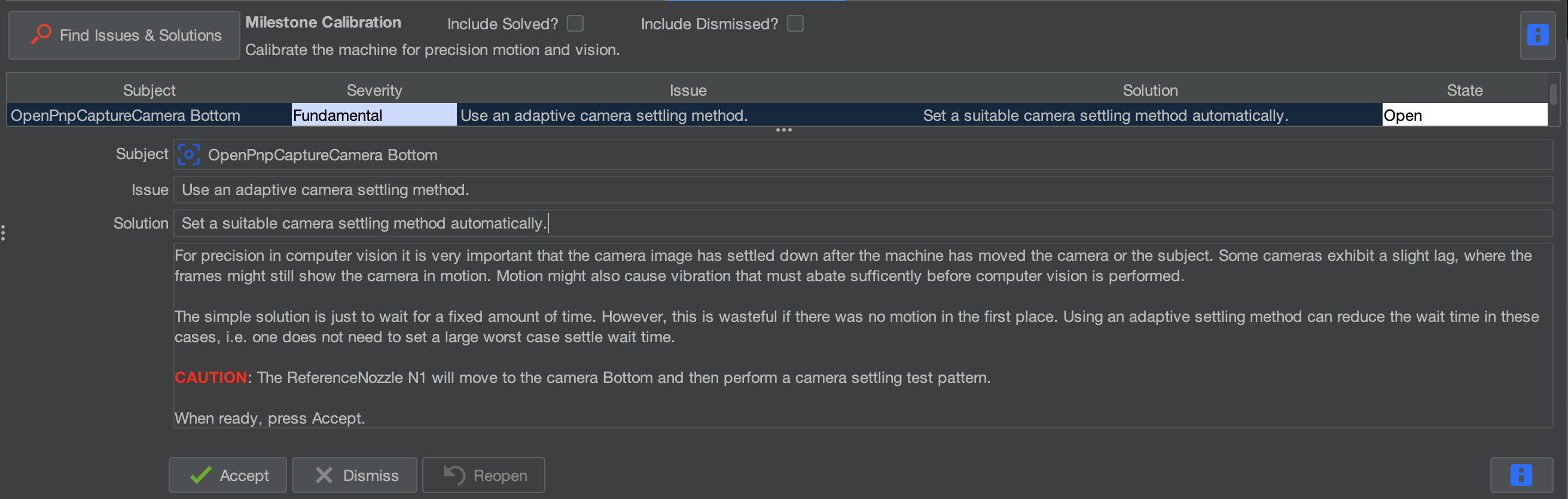
Use an adaptive (bottom) camera settling method
What This Step Does
When the machine moves, small vibrations can cause the camera image to shift slightly before stabilizing.
Adaptive settling allows OpenPnP to automatically determine when the camera image has stabilized before capturing an image.
This improves detection accuracy and helps prevent blurry or inconsistent vision results.
Enable Adaptive Settling

Click accept to apply the recommended configuration.
OpenPnP will enable adaptive camera settling for the top camera.
No manual adjustments are required.
Complete the Calibration
Once the process finishes and the issue is marked as Solved, click:

Calibration Complete
Now that you've completed the precise nozzle tip offset calibrations, you are done with the initial Issues and Solutions Setup. Do not do any other I&S Steps until you properly validate the FTP Board by placing components accurately on it. The FTP board gives you a known good position file and PCB to use before using your own position files and PCBs, which gives you a known working state to validate the machines calibration. Before validating the calibration with the FTP board, we need to confirm your homing is set up properly after calibration has been completed.